What is a .gcode file? What's inside, and why it fits one printer
G-code is a text list of commands a printer carries out line by line: where the nozzle goes, how much material to push, which temperature to hold. A slicer writes it from a 3D model for one particular printer and adds comments with the print time, filament use and a preview. The model itself isn't in it – only the path of the nozzle.
At a glance
- Extension
- .gcode, .gco, .g
- Type
- Toolpath (instructions for the printer)
- Created by
- EIA RS-274, RepRap
- Standard
- ISO 6983 (CNC)
- Specification
- RepRap wiki: G-code
- macOS without an app
- Doesn't know it: no preview, no thumbnail
Facts checked November 4, 2026
One command per line
Each line is one instruction made of "words": a letter and a number. G1 X10 Y-5 F2400 means "move in a straight line to X 10, Y −5 at 2400 mm/min". G starts a move, M other commands (temperatures, the fan), T a tool change. X, Y and Z are the axes, E the extruded material, F the speed, S a temperature or spindle speed. Everything after a semicolon is a comment.
This is the start of one layer from a real file, a 3DBenchy from PrusaSlicer 2.9.5:
;LAYER_CHANGE
;Z:0.6
;HEIGHT:0.2
;BEFORE_LAYER_CHANGE
G92 E0.0
;0.6
G1 E-.7 F2700
G1 X135.159 Y110.836 Z.4 F21000
G1 X136.128 Y110.075 Z.6 F4491.905
;AFTER_LAYER_CHANGE
;0.6
G1 X136.128 Y110.075 F21000
G1 Z.6 F720
G1 E.7 F1500
The nozzle pulls the filament back (E-.7), travels fast while climbing to the new layer at 0.6 mm, and pushes the filament forward again (E.7).
G-code comes from machine tools. In the US it was defined by the RS-274 standard, whose last revision, RS-274-D, dates from 1979, and internationally by ISO 6983. It reached 3D printing through the RepRap project. For 3D printers, though, there's no common standard: each firmware – Marlin, Klipper, RepRapFirmware, Prusa's – has its own commands and its own extensions.
Besides .gcode, the extensions .gco and .g are used too. Klipper lists all three from its virtual SD card, and so does Marlin, which shows any file whose 8.3 extension starts with G.
What the slicer writes into the file
The commands alone would be enough for the printer. But the slicer adds comments that tell you almost everything about the print. The start of the same file:
; generated by PrusaSlicer 2.9.5 on 2026-07-03 at 11:30:45 UTC
; printer_model = COREONE
; filament_type = PC
; nozzle_diameter = 0.4
; layer_height = 0.2
; temperature = 285
; filament used [mm] = 5786.33
; filament used [g] = 16.98
; filament cost = 1.27
; estimated printing time (normal mode) = 1h 4m 39s
; estimated printing time (silent mode) = 1h 10m 11s
On top of that, the file carries:
- Previews, encoded as text (base64) between lines like
; thumbnail beginand; thumbnail end. This file has four: three QOI images for the printer's display (16 × 16, 313 × 173 and 480 × 240 pixels) and one 380 × 285 PNG for computers. - The type of each stretch of path. Before each one is a line like
;TYPE:External perimeteror;TYPE:Internal infill. The Benchy has 772 of them for the outer perimeter and 163 for internal infill. Viewers colour the path by them. - Layer boundaries:
;LAYER_CHANGE,;Z:and;HEIGHT:. The Benchy has 240 layers. - The slicer's full settings at the end of the file, between
; prusaslicer_config = beginand= end. Here that's 373 lines. - Print progress for the display: lines like
M73 P0 R64say what percentage is done and how many minutes remain;QandSdo the same for silent mode.
Each slicer writes its comments its own way, though. PrusaSlicer marks the type of a path ;TYPE:External perimeter, Cura ;TYPE:WALL-OUTER, Bambu Studio and OrcaSlicer ; FEATURE:. A viewer that doesn't know another slicer's markers can't colour that part of the path.
All those comments make G-code big. The Benchy has 180,291 lines and 4.5 MB, 142,090 of them G1 moves. The same print saved as binary .bgcode is 1.76 MB.
Why G-code fits only one printer
G-code is sliced for one printer: its bed size, nozzle diameter, firmware and start sequence. NIST's report from 2000 already warned that a program for one machine probably won't run on another maker's. It's the same with 3D printers.
Prusa printers check for themselves. The Benchy starts with these lines:
M862.1 P0.4 A1 F0
M862.3 P "COREONE"
M862.5 P2
M115 U6.5.3+12780
M862.1 checks the nozzle diameter, M862.3 the printer model and M862.5 the G-code level. M115 U compares the firmware version: if the firmware is older, Prusa's documentation says the printer pauses for 30 seconds and asks you to update. When the model doesn't match, the printer warns that the G-code was sliced for a different printer type – and people on the Prusa forum ask whether it's safe to continue.
The safe path is always the same: slice the model again for your own printer. Sharing finished G-code only makes sense between identical printers with the same nozzle.
In the slicer you choose the G-code flavor. PrusaSlicer offers more than ten, from Marlin 2 through Klipper to RepRapFirmware. When Bambu Studio exports a sliced plate, it saves a .gcode.3mf package with the G-code for each plate inside.
Can G-code be turned back into a model?
No. G-code carries the path of the nozzle, not the shape. Sites that offer G-code to STL conversion build an approximate volume out of the paths, supports and infill included. That isn't the original model, and smooth shapes don't come back from 0.2 mm layers. If you need the model, ask the designer for the STL, 3MF or STEP.
How to look inside G-code on a Mac, iPad and iPhone
macOS has no file type for G-code. TextEdit opens it as text, and the Finder shows a blank icon – no preview, no thumbnail. On Windows, PowerToys covers it; on a Mac you need an app:
- PrusaSlicer G-code Viewer is free and reads G-code from PrusaSlicer, Cura, Simplify3D and other slicers.
- Web viewers like gcode.ws show the path layer by layer right in the browser. gcode.ws itself says it is "slow, memory hungry".
- ThumbHost3mf adds Finder thumbnails from the preview the slicer saved into the file.
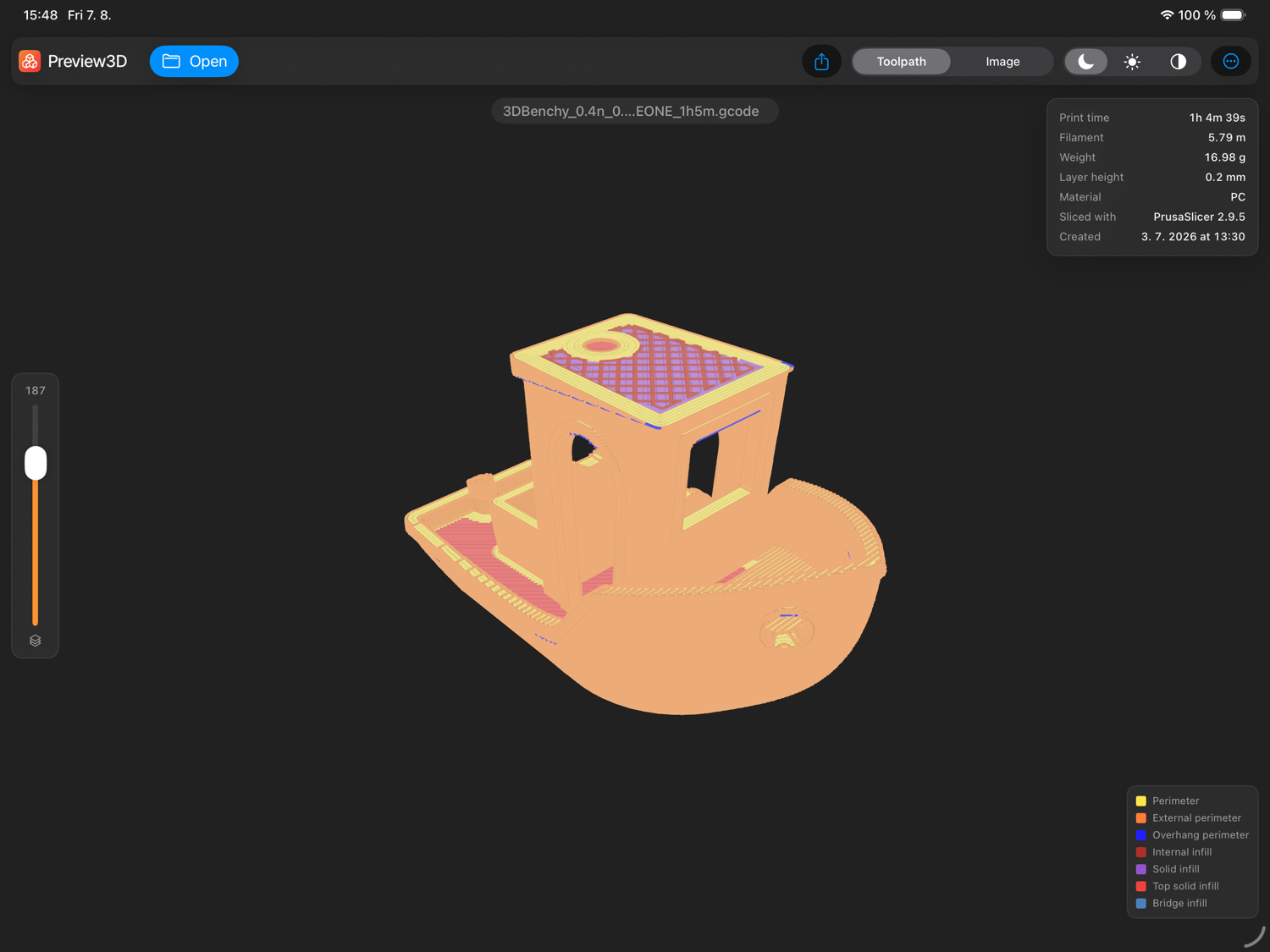
- Preview3D, my app, opens G-code in its window, in Quick Look and as a Finder thumbnail, on Mac, iPad, iPhone and Apple Vision Pro.
What Preview3D shows from G-code:
- the path coloured by type, with a legend, the way the slicer draws it,
- extrusions at their real width,
- a layer slider to open the print at any height,
- print time, filament, weight and material from the header,
- as the Finder thumbnail, the preview the slicer saved into the file.
It reads G-code from PrusaSlicer, SuperSlicer, OrcaSlicer, Cura and Bambu Studio.
More on what a G-code preview is good for: How to look inside a G-code file without opening a slicer.
Common questions
Does G-code work on every 3D printer?
No. It's sliced for a particular printer, nozzle and firmware. On another printer it may print off the bed, at the wrong temperature, or not start at all.
What's the difference between .gcode, .gco and .g?
None – it's the same text format with different extensions.
Where in a G-code file are the print time and filament use?
In the comments at the start or end of the file. PrusaSlicer writes ; estimated printing time (normal mode) and ; filament used [g]; Cura and Bambu Studio write similar lines in their own format.
Can I edit G-code?
In a text editor, yes, but editing a print by hand is risky. Change temperature, layer height or material in the slicer and slice the model again.
Can G-code be converted to STL?
Not into the original model. You can only build an approximate volume from the paths, supports and infill included.
What's the difference between .gcode and .bgcode?
They hold the same commands; .bgcode is binary and compressed. The details are on the .bgcode page.
Related pages
- The .bgcode file – binary G-code from PrusaSlicer
- The .3mf file – the project the slicer makes G-code from, and the .gcode.3mf package
- How to look inside a G-code file without opening a slicer
Sources
- RepRap wiki: G-code – command syntax, comments, extensions
- NIST: The NIST RS274NGC Interpreter, Version 3 – CNC origin, RS-274-D
- Marlin: G-code and Klipper: G-Codes
- Prusa Knowledge Base: Prusa firmware-specific G-code commands – M862, M115, M73
- Prusa Knowledge Base: PrusaSlicer G-code Viewer
- PrusaSlicer: thumbnails in G-code and feature-type markers
- CuraEngine: G-code export and OrcaSlicer: feature-type markers
- Klipper: extensions on the virtual SD card and Marlin: listing files on the SD card
Which slicer's G-code did Preview3D colour wrong? Send it to me at apps@xfanta.com and I'll add the markers it doesn't know yet.
Open it in Preview3D
STEP, 3MF, STL, G-code, BGCODE and more on Mac, iPad, iPhone and Vision Pro. One purchase, no account, no network.
Preview3D on the App Store