Shaded, with edges, or wireframe: three ways to look at one model
October 7, 2026
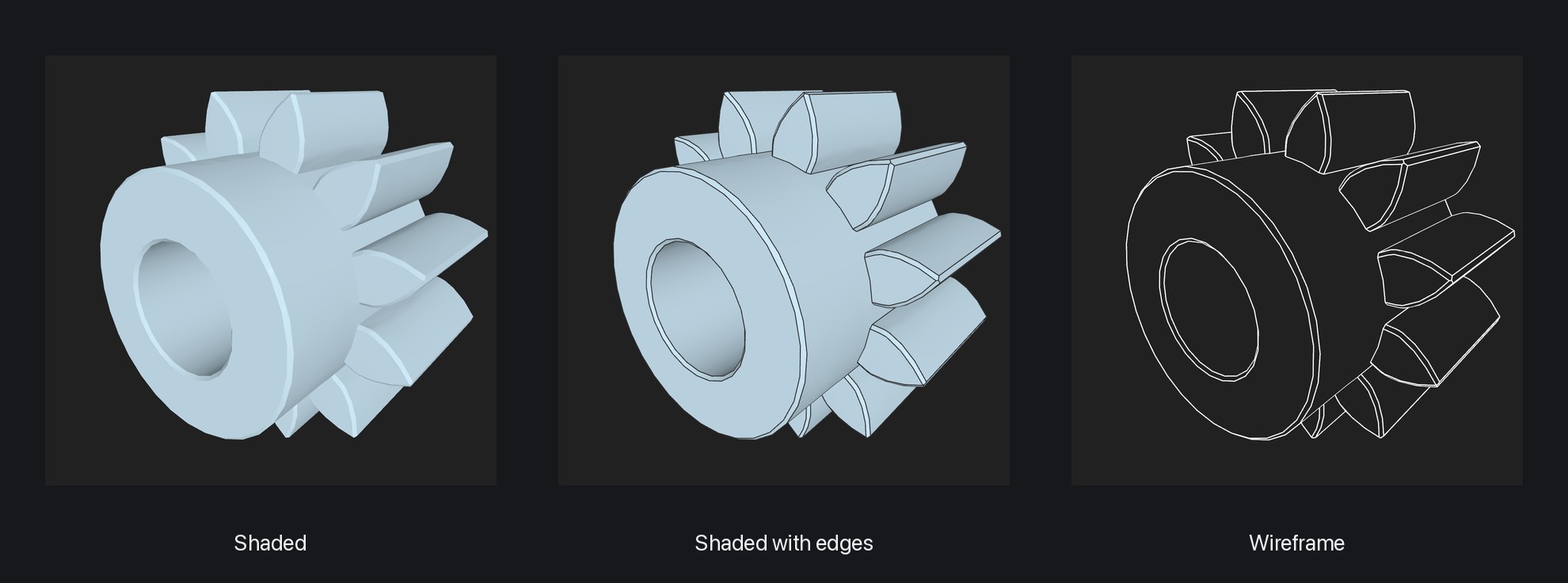
A shaded model shows its shape, but not always what it is made of. Where a fillet ends, where the next face begins, what a part hidden behind another looks like. So since 1.4.0, Preview3D draws a model three ways, and one click switches between them.
Where to switch
On the Mac the switch sits at the right of the window bar, on the iPad in the toolbar, and on the iPhone in the view menu. The app remembers your choice, so the next model opens the way you left the last one.
Shaded
The default view: the model with light and shadow, in the colours the file carries. It is the one for the overall shape and for a painted 3MF from your slicer.
Shaded with edges
Thin dark lines are drawn over the shaded model. In a STEP file they are the real edges, the ones the CAD system drew, so you can see where faces meet and exactly where a fillet or a chamfer begins.
STL, 3MF and OBJ have no edges – they are just meshes of triangles. For those the app finds the creases, the places where neighbouring triangles meet at a sharp angle. So even a downloaded STL reads as a shape rather than a heap of triangles.
Wireframe
Only the lines remain: the edges and the outline of the model. The faces are still there, just not painted, and they hide what is behind them, so the edges on the far side of a part do not show through the near one. The result looks like a technical drawing.
A model without a single crease, such as a sphere or a smooth scan, is drawn as a mesh of triangles in wireframe. The outline alone would say nothing about its shape.
Apple Vision Pro does not have the three modes yet; there the model is always shaded.
When a model looks wrong
A missing face, an edge where there should not be one, a file that will not open: you can send me a model like that through the form on the website. Attach the file or a link to it (Printables, Thingiverse, GrabCAD) and say in a few words what you see. Your email is optional – it is only there so I can let you know when the bug is fixed.
I use the model only to find and fix the bug in Preview3D and its 3D kernel. I do not publish it or pass it on, and I delete it once the bug is fixed, within a year at the latest. Quite a few fixes in recent versions came out of files like that.
Preview3D opens STEP, STL, 3MF, OBJ, G-code and other formats – in a window, through Quick Look, and as Finder thumbnails. $9.99 once, for Mac, iPad, iPhone and Apple Vision Pro, fully offline.