STEP viewer for Mac
Open a STEP or STP file from a vendor and see it instantly — exact geometry, real colors, measurements and manufacturing data — without installing a heavyweight CAD package or uploading anything to the web.
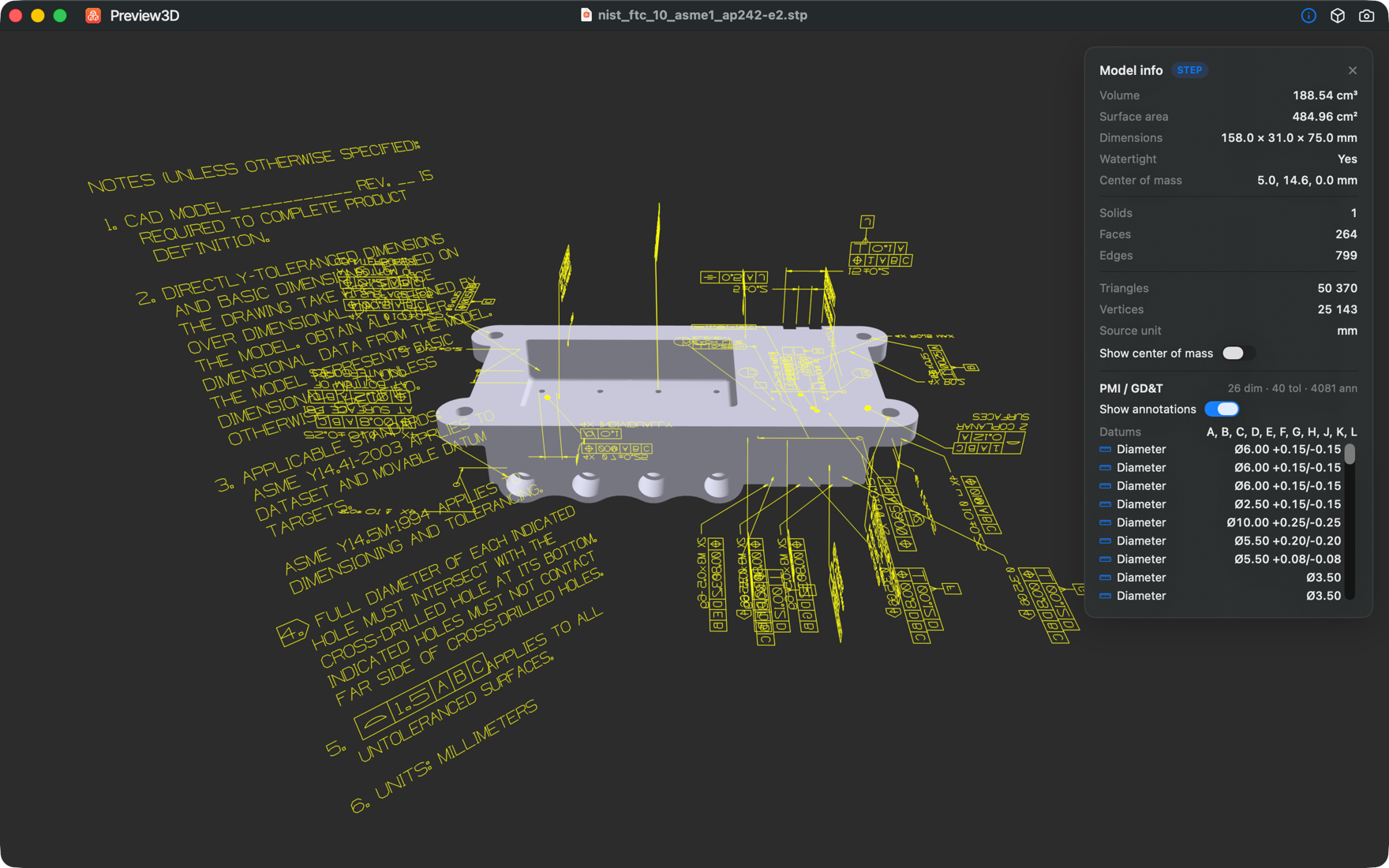
Real STEP geometry, not a rough mesh import
Preview3D reads STEP (ISO 10303) with a pure-Swift B-rep kernel (StepKit) — no OpenCASCADE, no external CAD engine. It tessellates the exact boundary representation into a watertight, smooth-shaded mesh with crease-aware normals, so cylinders stay round and edges stay crisp.
It supports STEP AP203, AP214 and AP242, including planes, cylinders, cones, spheres, tori, surfaces of revolution/extrusion and NURBS.
Per-part colors and assembly structure
Files that carry colors (STYLED_ITEM / COLOUR_RGB) render each part in its assigned color. Assemblies show as a browsable tree of sub-parts — click a part to highlight and isolate it in the view, and export it on its own. Repeated parts are instanced at their true positions, so large assemblies stay light.
Measure and inspect — including PMI / GD&T
The info panel shows volume, surface area, centre of mass, watertightness, bounding-box dimensions, the source unit and B-rep structure (solids, faces, edges). For AP242 files, Preview3D reads semantic PMI — dimensions with tolerances, geometric tolerances and datums — and draws the graphical annotations right over the model.
Quick Look and Finder thumbnails for STEP
Press the spacebar on a .step or .stp file in Finder for a real 3D Quick Look preview, and get 3D thumbnails in icon and gallery views — something macOS can't do for STEP on its own.
Convert STEP when you need a mesh
Turn STEP into STL, OBJ, GLB or USDZ with one click — the whole model or a single selected sub-part — all locally on your Mac.
Frequently asked questions
Do I need OpenCASCADE or a CAD app to view STEP?
No. Preview3D reads STEP with its own pure-Swift B-rep kernel (StepKit). Nothing else to install, and your files never leave your Mac.
Which STEP versions are supported?
STEP AP203, AP214 and AP242 (.step and .stp), including exact B-rep geometry, colors, assemblies and AP242 PMI/GD&T.
Does it show STEP colors and assemblies?
Yes. Files with STEP colors render each part in its color, and assemblies show as a part tree you can click to highlight, isolate and export.
Can I convert a STEP file?
Yes — one-click convert to STL, OBJ, GLB or USDZ, for the whole model or a single sub-part.
Does it run on Intel Macs?
No. Preview3D is Apple Silicon only and requires macOS 14 Sonoma or later.
Ready to open your files?
Native, offline, one-time purchase. macOS 14+, Apple silicon.
Get Preview3D — $9.99