What is a .bgcode file? Prusa's binary G-code, explained
A .bgcode file is G-code that PrusaSlicer, since version 2.7, saves in binary form. Prusa says it is about 70% smaller on average – but no text editor can read it, and almost nothing outside Prusa's printers supports it. Here is what's inside, what opens it, and how to turn it back into a plain .gcode.
At a glance
- Extension
- .bgcode
- Type
- Toolpath (instructions for the printer)
- Created by
- Prusa Research
- Since
- 2023
- Standard
- Not a formal standard
- Specification
- libbgcode
- macOS without an app
- Doesn't know it: no preview, no thumbnail
Facts checked November 2, 2026
The same commands in a different wrapper
A .bgcode carries exactly the same printer instructions as a text G-code file: where the nozzle goes, how much to extrude, which temperature to hold. Only the packaging differs. Instead of one long text, the file is split into blocks, and each block can be compressed and carry its own checksum.
Prusa introduced the format in 2023 with PrusaSlicer 2.7 and published the specification in the libbgcode repository on GitHub. So it is open, but it isn't a standard like STEP or 3MF – it belongs to Prusa Research. The library that reads and writes it is licensed under AGPL-3.0.
There are three reasons for it. A smaller file copies to a USB stick and travels over the network faster. The printer finds what it needs sooner, because the print details and previews sit in their own blocks and it doesn't have to read the whole toolpath to get them. And the checksums catch a file that got damaged on the way.
Inside: a GCDE header and blocks in a fixed order
Every .bgcode starts with the four letters GCDE. Then comes the format version (only version 1 exists so far) and the checksum type, which in practice is CRC32. The blocks follow, always in the same order:
- file metadata – what produced the file,
- printer metadata – which printer and nozzle the print is for,
- thumbnails – pictures of the model, one per block,
- print metadata – estimated time, filament used,
- slicer metadata – the full settings PrusaSlicer sliced with,
- G-code blocks – the toolpath itself.
The metadata are plain key = value pairs. PrusaSlicer compresses the toolpath with Heatshrink, an algorithm made for devices with little memory, and also encodes it with MeatPack, which writes the 15 most common G-code characters in four bits instead of eight. MeatPack started life as an OctoPrint plugin to speed up slow serial links to printers.
How much smaller it is
Prusa says binary G-code came out about 70% smaller than text on average in its tests. In libbgcode's own test data, a small cube shrinks from 641,092 to 149,258 bytes – just under a quarter. How much you save depends on the model and the print settings.
What reads it and what doesn't
| Software or printer | .bgcode |
|---|---|
| Prusa printers on Buddy firmware 5.1.0 or newer (MINI, MK4 and MK4S, MK3.5, MK3.9, XL, CORE One) | yes |
| PrusaSlicer and its G-code viewer | yes, and converts it |
| PrusaLink and Prusa Connect | yes |
| Repetier-Server | from version 1.4.16 |
| OctoPrint | only with the BGCode plugin |
| Klipper | no |
| OrcaSlicer, Bambu Studio | no |
| Original Prusa MK3S | PrusaSlicer doesn't enable it |
| macOS (Finder, Quick Look) | no |
| Preview3D (Mac, iPad, iPhone, Vision Pro) | yes |
Why your printer doesn't show the file
The usual reason is older firmware. Prusa printers on Buddy firmware older than 5.1.0 don't list .bgcode files at all, so the USB stick looks empty. Update the firmware, or convert the file to text G-code.
The other reason is a printer that doesn't know the format at all. Klipper and printers from other makers don't, and PrusaSlicer won't save it for them either. If someone with a Prusa printer sent you a .bgcode, convert it.
From .bgcode to .gcode and back
In PrusaSlicer, conversion lives under File → Convert:
- Convert binary G-code to ASCII turns a .bgcode into a text .gcode,
- Convert ASCII G-code to binary goes the other way.
If you prefer the command line, libbgcode comes with a bgcode tool. bgcode model.bgcode writes a text model.gcode next to it.
To stop PrusaSlicer saving .bgcode altogether, open Preferences (in the PrusaSlicer menu on a Mac, ⌘ ,), go to the Other tab and turn off Use binary G-code when the printer supports it. That switch exists since 2.7.1. Version 2.7.0 saved .bgcode by default for every printer that supports it – and broke uploads to OctoPrint in the process.
How to look inside a .bgcode on a Mac, iPad or iPhone
macOS knows nothing about .bgcode. It has no file type for it, the Finder shows a blank icon and the space bar (Quick Look) shows nothing. On Windows, PowerToys covers it; on a Mac you need to add something.
- PrusaSlicer opens it in its G-code viewer and shows the toolpath layer by layer. It's free, but you start a whole slicer for one preview.
- ThumbHost3mf adds Finder thumbnails, .bgcode included. It doesn't show what's inside the file.
- Preview3D, my app, opens .bgcode in its window, in Quick Look and as a Finder thumbnail. It draws the toolpath coloured by feature (perimeters, infill, bridges, supports), has a layer slider, and reads the print time, filament length, weight, layer height and material from the metadata. It works the same on iPad, iPhone and Apple Vision Pro.
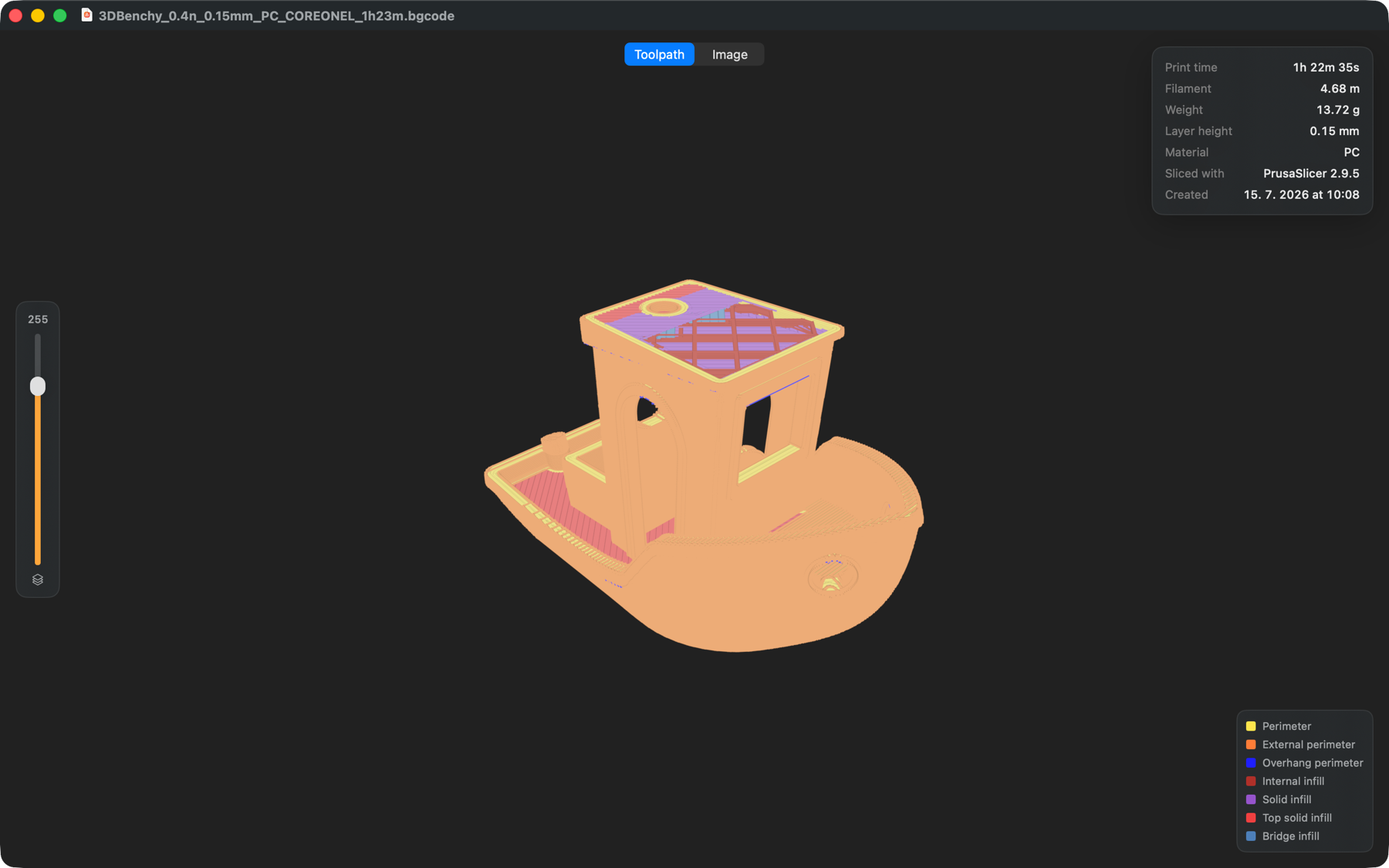
Thumbnails: QOI for the printer, PNG for computers
A file from PrusaSlicer usually holds several thumbnails. The ones for the printer's display are QOI (Quite OK Image), which Prusa adopted with firmware 5.1.0 because decoding PNG was too heavy for the printer. For computers, PrusaSlicer adds one more image as PNG.
That explains why some tools show no preview for a .bgcode: they can't read QOI. Preview3D uses the PNG for the Finder.
Common questions
Is .bgcode better than .gcode?
For a Prusa printer that supports it, yes: the file is smaller and damage gets caught. For everything else, no – you can't read it without converting it, and most software doesn't know it.
Can slicers other than PrusaSlicer make .bgcode?
As far as I know, PrusaSlicer is the only widely used slicer that writes it. OrcaSlicer and Bambu Studio don't support it. Text G-code from another slicer can be converted in PrusaSlicer or with the bgcode tool.
Does OctoPrint support .bgcode?
Not by itself. The BGCode plugin converts an uploaded file to text G-code. OctoPrint's maintainers declined native support, arguing that .bgcode is meant for storage on the printer, not for sending to it.
Can I open a .bgcode in a text editor?
No, it's binary. Convert it to .gcode first, as described above.
Does a .bgcode carry colours and the material?
The same way G-code does: filament changes are in the commands, and the material type and amount used are in the metadata. The 3D model and textures aren't in it – only the path of the nozzle.
Related formats
- G-code – the text form of the same instructions. How to look inside one without a slicer: G-code without a slicer.
- 3MF – the project PrusaSlicer slices the G-code from. See the 3MF viewer for Mac.
Sources
- The format specification in the libbgcode repository
- Prusa Knowledge Base: Binary G-code
- PrusaSlicer 2.7.0 on GitHub
- Buddy firmware 5.1.0 on GitHub
- OctoPrint issue #4900 and the BGCode plugin
- Repetier-Server 1.4.16
Do you print .bgcode anywhere other than a Prusa printer – through Repetier-Server, say, or OctoPrint with the plugin? Write to me at apps@xfanta.com and tell me what works; I'll add it to the table.
Open it in Preview3D
STEP, 3MF, STL, G-code, BGCODE and more on Mac, iPad, iPhone and Vision Pro. One purchase, no account, no network.
Preview3D on the App Store