What is a .step or .stp file? And how to open it on a Mac
STEP is an international format (ISO 10303) that CAD systems use to hand each other models with exact geometry: real cylinders, holes and fillets, not a mesh of triangles. .step and .stp are the same thing. macOS can neither open nor preview it; here is what's inside and what opens it.
At a glance
- Extension
- .step, .stp
- Type
- CAD model (exact B-rep geometry)
- Created by
- ISO TC 184/SC 4
- Since
- 1994
- Standard
- ISO 10303
- Specification
- ISO 10303-242 (AP242)
- macOS without an app
- Doesn't know it: no preview, no thumbnail
Facts checked November 4, 2026
Exact shape, not a mesh of triangles
An STL describes a surface with thousands of small triangles. STEP stores the shape the way the CAD system made it: this is a cylinder 6 mm across, this is a plane, this is a fillet with a 2 mm radius. The technical term is B-rep (boundary representation) – a solid described by the surfaces that bound it.
That has a consequence people tend to miss: the file itself has no "smoothness". To display or print it, a program has to cut it into triangles (tessellation) to some tolerance, so two programs can show the same file with different smoothness.
The file is plain text. It always starts with the line ISO-10303-21;, the name of part 21 of the standard, which defines how it's written; its first edition is from 1994. You can open it in a text editor, but there is little to read in lines like #123=ADVANCED_FACE(...). The extension .p21 names the same encoding in general.
What STEP carries and what it doesn't
- Exact geometry: curved surfaces, edges and solids, not an approximation of them.
- Units: written into the file explicitly, so a program knows whether the model is in millimetres or inches.
- Assemblies: part names and where each one sits. A repeated part isn't copied into the file, just referenced.
- Colours: depending on the protocol, see below.
- Dimensions and tolerances (PMI): only with the AP242 protocol.
It doesn't carry the modelling history. Sketches, constraints and parametric features aren't in the file: you get the resulting solid, not the intent the designer built it with. No animation and no print settings either. And you can't get it back from another format: a cylinder, a hole or a thread can't be recovered from a mesh of triangles.
AP203, AP214 and AP242: why your file is grey
What a file contains depends on the application protocol the CAD system picked when it exported:
- AP203 was built for aerospace. The first edition has no colours or layers; the second (2011) added them.
- AP214 is the automotive one, and adds colours, layers and tolerance data.
- AP242 from 2014 replaced both. It carries dimensions and tolerances (PMI) in machine-readable and graphical form. The latest edition is from 2025.
A common complaint about STEP is a file that arrived without colours. Typically the exporter switched to the first edition of AP203. You can tell the protocol from the header: open the file in a text editor and look for the FILE_SCHEMA line. Here are the lines from three files I have at hand:
FILE_SCHEMA(('AP203_CONFIGURATION_CONTROLLED_3D_DESIGN_OF_MECHANICAL_PARTS_AND_ASSEMBLIES_MIM_LF'));
FILE_SCHEMA(('AUTOMOTIVE_DESIGN { 1 0 10303 214 1 1 1 1 }'));
FILE_SCHEMA(('AP242_MANAGED_MODEL_BASED_3D_ENGINEERING_MIM_LF { 1 0 10303 442 3 1 4 }'));- The first is the sample assembly AS1, protocol AP203. It has colours, as you'll see in the screenshot below, so AP203 on its own doesn't mean grey.
- The second is a model from FreeCAD, protocol AP214.
- The third is a test part from NIST, protocol AP242.
A name that starts with AP203, AP214 or AP242 states the protocol outright. Older files need the nicknames: CONFIG_CONTROL_DESIGN is the first edition of AP203, so no colours, and AUTOMOTIVE_DESIGN is AP214. NIST's STEP file analyzer reads the protocol from the header the same way.
If you have a grey file and access to the original CAD, export again with AP214 or AP242. The choice is in the STEP export options; in SolidWorks, for example, you pick between AP203 and AP214.
STEP or STL?
Send STEP whenever the other side may want to measure, edit or manufacture the part: a machine shop, a supplier, an engineer on a different CAD. Anyone can reduce it to STL themselves; the other way round doesn't work. STL is right for a finished part going to print, where nobody will change anything.
Current slicers (PrusaSlicer, Bambu Studio, OrcaSlicer) can load STEP directly and make the triangles themselves, so converting to STL beforehand isn't necessary, whatever many guides still say.
What writes and reads STEP
Practically every CAD system writes it, for example SolidWorks, Fusion, Inventor, Creo, CATIA, Siemens NX, Onshape, FreeCAD and Shapr3D. KiCad's library of component 3D models is in STEP too. The same systems read it, plus slicers, the eDrawings Viewer, NIST's file analyzer and Preview3D.
How to open STEP on a Mac, iPad and iPhone
macOS knows nothing about STEP. It has no file type for it, the Finder shows a blank icon and the space bar (Quick Look) shows nothing. On a Mac you need a program:
- [FreeCAD](https://www.freecad.org/) is free and opens STEP, but it's a full CAD, not a viewer.
- [eDrawings Viewer](https://www.edrawingsviewer.com/) from Dassault Systèmes is only for viewing.
- [MacStep](https://github.com/den200/macstep) is an open-source viewer, still at an early stage.
- Preview3D, my app. It opens the file in a window, in Quick Look and as a Finder thumbnail, and runs on iPad, iPhone and Apple Vision Pro too. Files go nowhere.
What Preview3D shows from a STEP file:
- the exact geometry: it reads the file with its own kernel, StepKit, and tessellates straight from the exact surfaces, so cylinders stay smooth and edges stay crisp,
- the edges the CAD system drew, not the borders of triangles,
- part colours,
- the assembly tree, where you pick a part, highlight it and isolate it,
- in Model info, volume, area, centre of mass, dimensions, the source unit, watertightness and the number of solids, faces and edges,
- an Explode slider for assemblies,
- progress with a Cancel button while a large file loads,
- on the Mac, also the dimensions and tolerances (PMI) from AP242.
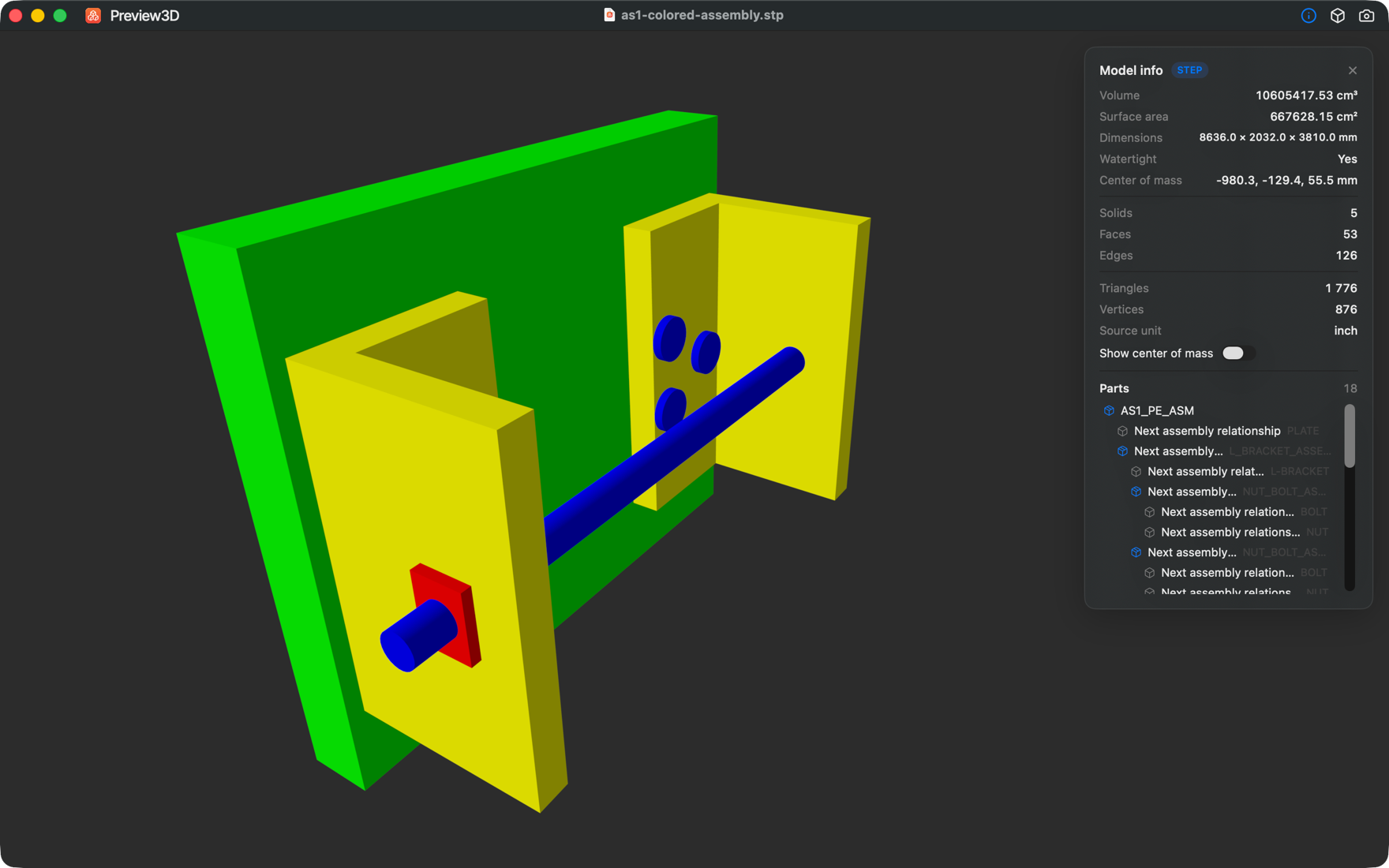
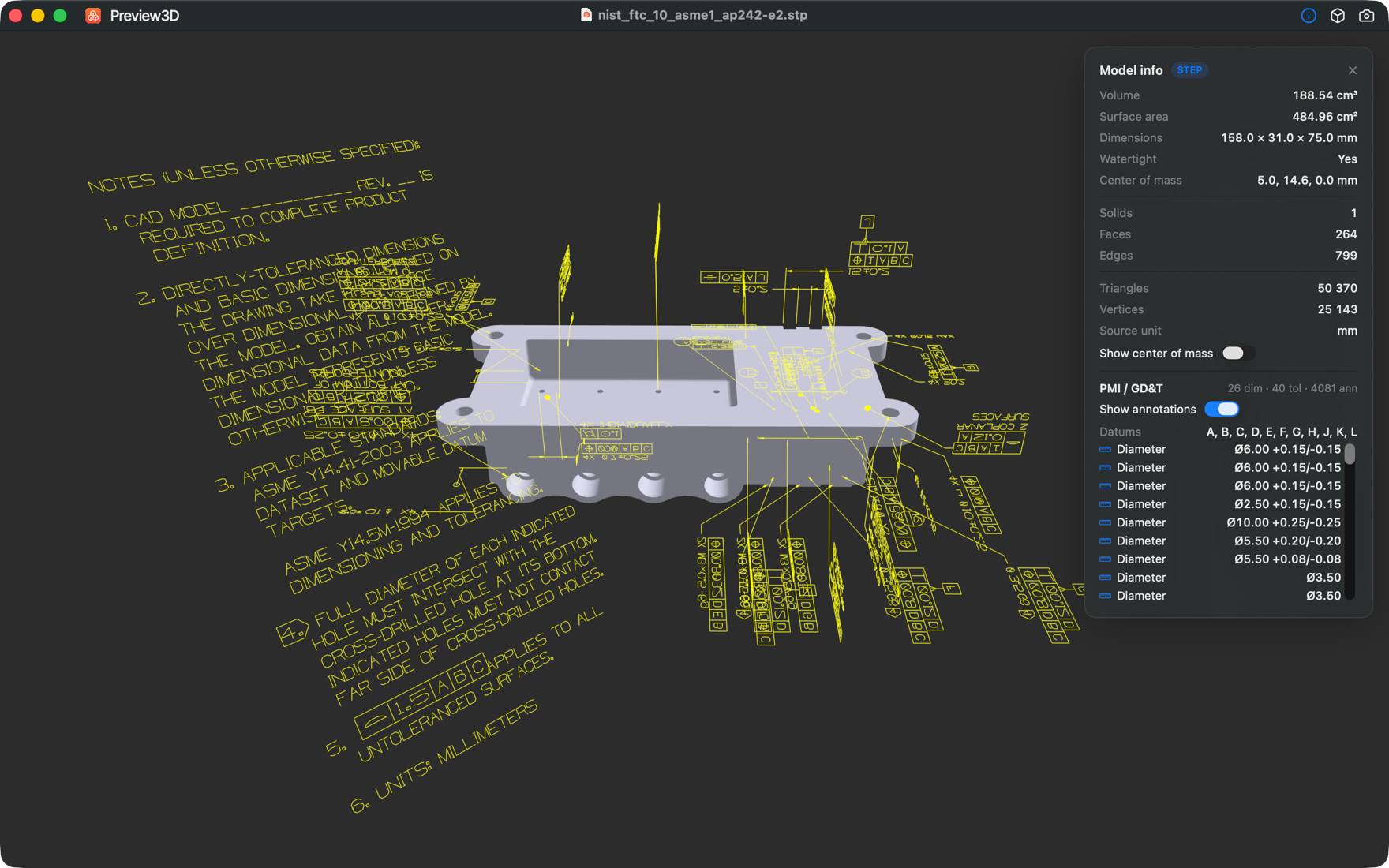
The test part in the second image is FTC-10 from NIST's MBE PMI Validation and Conformance Testing project. NIST says its test files can be used without any restrictions and asks for credit. What PMI actually is in the file, I wrote up in The dimensions that live in the model, not on the drawing.
Converting STEP to STL without uploading
Search for "step to stl" and you mostly get online converters, which upload your file to someone else's server. For a model that's internal, or that you don't want anyone to see, that's worth a thought.
On a Mac, Preview3D converts from File → Export model as… (⌥⌘E). For STEP it offers STL, OBJ, GLB and USDZ, always from the same exact tessellation and with no internet connection. You can convert the whole model or one selected part.
STL has no units, so slicers usually read the numbers as millimetres. If the model was in inches (like the AS1 assembly above; Model info shows the source unit), check its size in the slicer after converting. Step by step, it's on the Convert STEP to STL page.
Common questions
Is .step the same as .stp?
Yes. It's the same format; .stp is just the shorter extension.
Why is my STEP file grey?
Most likely the exporter picked the first edition of the AP203 protocol, which can't hold colours. Find the FILE_SCHEMA line in the file. If it contains CONFIG_CONTROL_DESIGN, that's it. Export again with AP214 or AP242.
Does STEP keep the modelling history?
No. You get the resulting solid, without sketches, constraints or parametric features.
Can an STL be converted back to STEP?
A file can be wrapped in the STEP format, but the exact surfaces don't come back. Every triangle stays a triangle.
Does PrusaSlicer open STEP?
Yes. Current versions of PrusaSlicer, Bambu Studio and OrcaSlicer load STEP directly.
Can I open STEP on an iPhone or iPad?
Yes, in Preview3D. Open the file from Files, AirDrop or another app. On iPad and iPhone there's also AR, which stands the model in the room.
Related pages
- STEP viewer for Mac – what the viewer does, in detail.
- Convert STEP to STL – step by step.
Sources
- Library of Congress: STEP Part 21 – file encoding, editions from 1994, 2002 and 2016
- ISO 10303-242 (AP242)
- prostep ivip: AP242 – editions and scope of the protocol
- STEP Tools: overview of the STEP standards
- Datakit: STEP protocols – what AP203 and AP214 store
- NIST STEP File Analyzer – how the protocol is read from
FILE_SCHEMA - NIST: test models with PMI
- Javelin: AP203 or AP214 when exporting from SolidWorks
Which STEP file did your Mac fail to open, or which one came out grey? Write to me at apps@xfanta.com with what it was and which CAD it came from, and I'll add it here.
Open it in Preview3D
STEP, 3MF, STL, G-code, BGCODE and more on Mac, iPad, iPhone and Vision Pro. One purchase, no account, no network.
Preview3D on the App Store