The dimensions that live in the model, not on the drawing
July 21, 2026
You get a STEP file and a PDF drawing with it. The model says what the shape is; the drawing says how big the hole is and to what tolerance. Two places, two files — and when the model is revised, the drawing is often forgotten.
The AP242 standard solves this by writing dimensions, tolerances and datums into the STEP file itself. It's called PMI — Product & Manufacturing Information — and it's machine-readable. Not a picture of a dimension, but the value "diameter 6.00, tolerance +0.15 / −0.15", which software can work with.
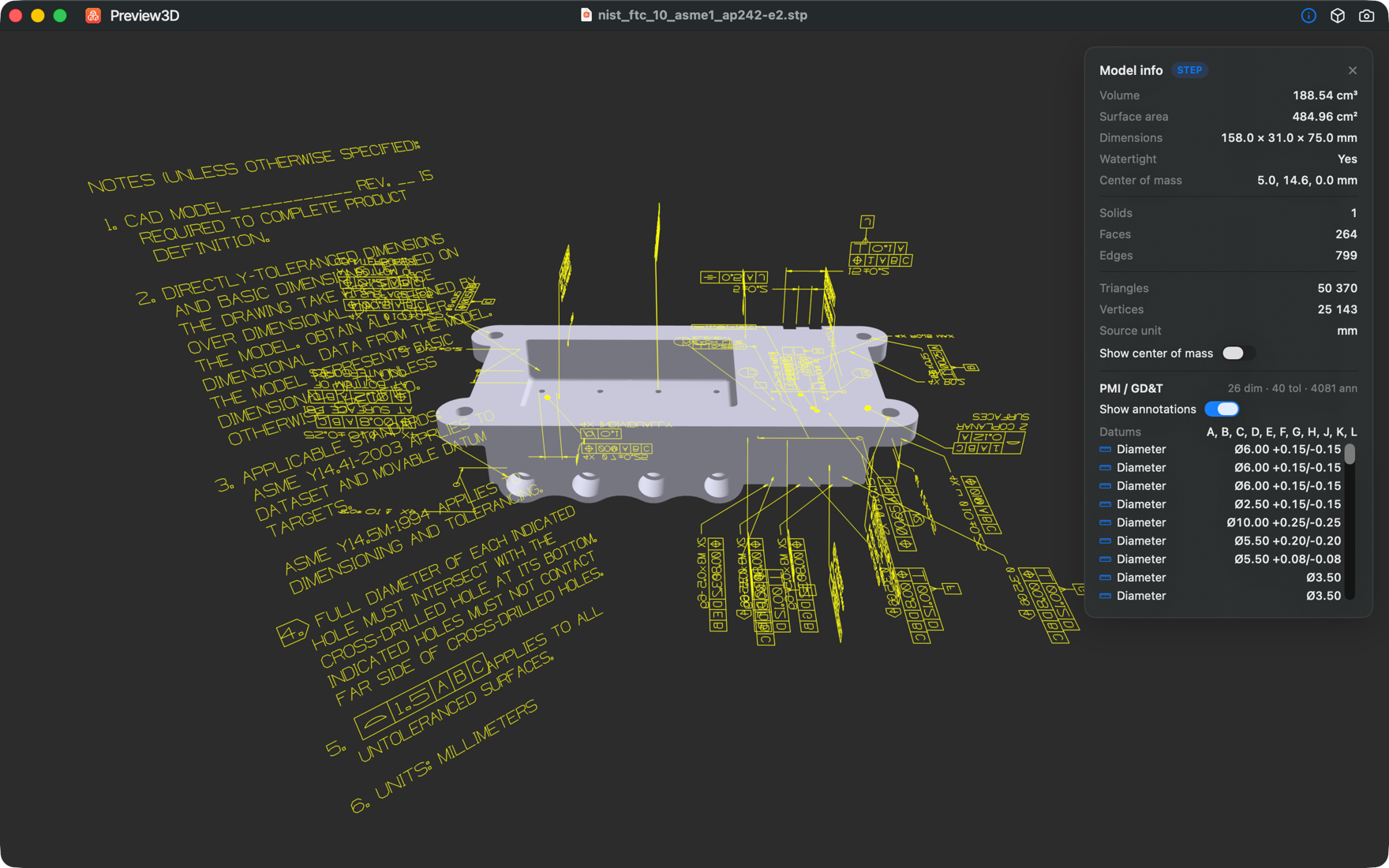
Two forms of the same thing
PMI is stored in the file in two ways, and Preview3D shows both.
Semantic PMI is the machine-readable content. The info panel lists dimensional callouts with their tolerance bands, geometric tolerances — flatness, position, perpendicularity, profile — each with its tolerance-zone size and datum references, and the datums themselves.
Graphical PMI is what you see in the picture above: dimension lines, leaders and symbols drawn in space around the model, where the engineer placed them. They can be switched off when they get in the way of the geometry.
The difference matters. The graphical layer looks good, but it's line art. The semantic one is what you can read an actual number from — and it's the one that usually gets lost, because plenty of viewers can't read it.
What it's for in practice
Most often for checking that a supplier sent what you expected. Open the STEP, look at the list of dimensions, and see the tolerances without hunting down the matching drawing and comparing revisions.
It's just as useful the other way round: before you send something out, verify that your export actually contains the PMI. Not every CAD writes it into STEP, and not every export setting keeps it. If you open the file in Preview3D and the PMI panel stays empty, you know immediately — rather than at the supplier.
What Preview3D doesn't do
It doesn't check whether the model meets the tolerances. It doesn't edit them, add them, or produce drawings. It's a viewer — it reads what's in the file and shows it.
The measurements the app computes itself (volume, surface area, bounding box) come from tessellation, the triangle approximation of the surfaces. Good for a quick sense of size, but for manufacturing go by what's written in the file as a dimension — which is precisely the PMI.
Reading PMI is a Mac feature. STEP files are loaded by StepKit, our own kernel written in pure Swift.
Preview3D — $9.99 once for Mac and iPad, no account, fully offline.